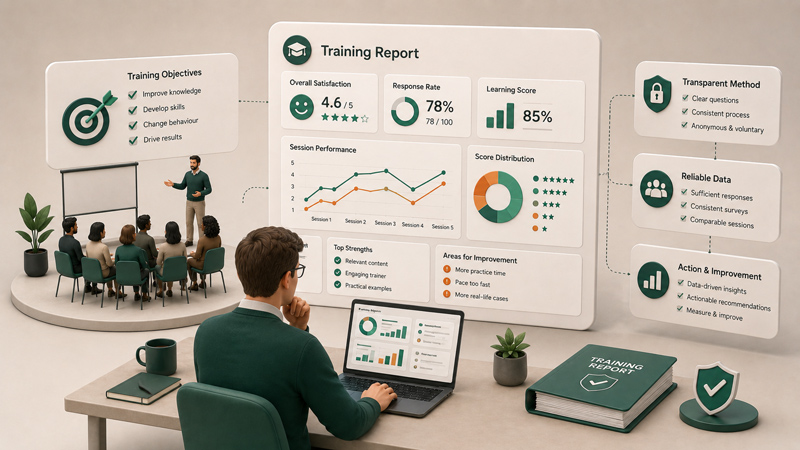
Collecting feedback is only the first step in a useful feedback process.
A customer may complete a satisfaction survey. A trainee may report that part of a session was unclear. An employee may raise a workplace concern. A prospect may submit a product-interest form. In each case, the response has been collected successfully.
But collection alone does not create value.
The real value begins when the feedback reaches the right person, enters the right system, and leads to an appropriate action. When this process depends on someone manually opening a survey dashboard, reviewing new responses, exporting data, copying information, and forwarding it to another team, important feedback can remain unnoticed for hours or even days.
Integrations help reduce that delay.
By connecting Enquete with other applications and internal systems, organisations can move survey data automatically and start follow-up actions much sooner. Enquete supports this through Zapier and standard webhooks, giving organisations both no-code and developer-focused ways to connect feedback with the rest of their operational workflow.
However, it is important to be precise about what integrations actually improve.
Integrations do not necessarily make respondents complete surveys faster. What they can do is significantly reduce the time between receiving a response and acting on it.
What Does Faster Feedback Actually Mean?
When people talk about faster feedback, they often think only about how quickly responses are collected.
For example, an organisation may send a survey immediately after a customer-support interaction or training session. That can help respondents answer while the experience is still fresh. But fast collection is only one part of the process.
A feedback workflow is only truly fast when the response also reaches the appropriate person quickly.
Imagine that a customer completes a complaint survey five minutes after speaking with your support team. The response has arrived quickly, but nobody reviews the survey dashboard until the following week. Technically, the feedback was collected fast. Operationally, the process was still slow.
Faster feedback therefore includes several stages. It includes how quickly the response is received, how quickly it is reviewed, how quickly it reaches the responsible team, and how quickly a follow-up action begins.
Integrations primarily improve the stages that happen after the respondent clicks submit.
They can send information directly to the tools your teams already use, removing the need for someone to transfer it manually. This means the right people can become aware of important feedback sooner and respond while the situation is still relevant.
Why Feedback Processes Are Often Slow
Many organisations already collect a significant amount of useful feedback. The problem is that the feedback remains isolated from their daily work.
Survey responses may sit inside a dashboard that only one or two people regularly check. Reports may be exported once a week or once a month. Individual responses may need to be copied into spreadsheets, customer records, support platforms, or project-management tools.
Every manual step creates another opportunity for delay.
A team member may forget to check the dashboard. A spreadsheet may not be updated. An urgent response may be mixed with hundreds of ordinary responses. The person responsible for reviewing feedback may be absent, busy, or unaware that a critical response has arrived.
This is especially risky when the feedback requires immediate attention.
A dissatisfied customer may be preparing to cancel a service. A trainee may report a safety issue. A patient may describe a serious service failure. An employee may raise a sensitive concern. A potential customer may request more information about a product.
In these situations, the usefulness of the response decreases when the organisation reacts too slowly.
The longer feedback remains disconnected from the systems where work actually happens, the more likely it is to be missed, forgotten, or handled too late.
How Integrations Remove Manual Work
An integration creates a connection between Enquete and another application or system.
Instead of relying on someone to move survey information manually, the integration can transfer the data automatically when a relevant event occurs.
A simple workflow may begin when a respondent completes a survey. Enquete records the response, and the integration then sends selected information to another destination. That destination could be a spreadsheet, customer relationship management system, support platform, internal application, messaging tool, or project-management system.
The receiving application can then store the information, alert a team member, create a task, update a record, or start another process.
This removes several repetitive steps.
Without an integration, a team member may need to sign in to Enquete, find the new response, copy the respondent’s details, open another application, create a new record, paste the information, and notify the responsible colleague.
With an integration, much of that process can happen automatically.
Automation also reduces the risk of human error. Information is less likely to be copied incorrectly, sent to the wrong person, or omitted from an internal record. The workflow becomes more consistent because each qualifying response is handled according to the same predefined process.
Sending Feedback Directly to the Right Team
One of the most valuable benefits of integration is the ability to move feedback closer to the people responsible for acting on it.
Not every employee needs access to the survey dashboard. In many organisations, asking multiple departments to monitor incoming survey responses would be inefficient and unrealistic.
A better approach is to send relevant feedback into the tools each team already uses.
A customer complaint could be sent to a support system where an agent can investigate it. A qualified sales lead could be added to a CRM and assigned to a sales representative. An event registration could be added to an operational spreadsheet. A negative training score could be forwarded to the trainer or learning and development team. An urgent internal response could trigger a notification for management.
This does not mean that every response should create an alert.
If a survey receives hundreds or thousands of responses, sending a notification for each submission could overwhelm the team and make genuinely important responses harder to notice. The workflow should be designed around relevance.
For example, an organisation may decide that only very low satisfaction scores, specific complaint categories, or requests for follow-up should trigger immediate action.
The objective is not to move every piece of feedback as quickly as possible. The objective is to ensure that feedback requiring attention reaches the appropriate person without unnecessary delay.
Using Zapier for No-Code Survey Automation
Zapier is suitable for organisations that want to connect Enquete with other applications without developing a custom integration.
It acts as a bridge between different platforms. A workflow in Zapier, commonly called a Zap, starts with a trigger and continues with one or more actions.
The trigger could be a completed survey response in Enquete. The action could then add the response to Google Sheets, create a contact in a CRM, send a notification, create a project-management task, or pass the information into another supported application.
This can be especially useful for smaller teams or organisations that do not have dedicated software developers.
For example, a training provider may use Enquete to collect evaluations after every course. Instead of exporting the responses manually, Zapier could automatically add each completed evaluation to a spreadsheet used for reporting. A low score could also create a task for the training manager to review the feedback.
A sales team could use a survey to qualify potential customers. When a respondent indicates interest in a demonstration, Zapier could create a new lead in the CRM and notify the responsible sales representative.
A customer-success team could send low satisfaction responses into its existing support workflow, allowing the team to follow up without repeatedly checking a separate survey platform.
The main advantage of Zapier is speed of implementation. Many useful workflows can be created through a visual interface without writing code.
However, the quality of the automation still depends on how well the workflow is designed. A badly configured Zap can create duplicate records, send incomplete information, or overwhelm teams with unnecessary notifications. The automation should be tested carefully before it becomes part of a live business process.
Using Webhooks for Custom and Real-Time Workflows
Webhooks provide a more technical and flexible way to connect Enquete with another system.
When a configured survey event occurs, Enquete can send data directly to a specified endpoint. The receiving application can then process that data according to its own rules.
This is useful for organisations that operate custom software, internal systems, specialised databases, or workflows that cannot be handled adequately through standard no-code integrations.
For example, a company may want survey responses to update an internal customer profile immediately. A software platform may need to trigger a custom workflow when a response is completed. A service provider may want feedback data to enter its own reporting system without passing through a third-party automation platform.
Webhooks give developers more control over how data is received, validated, stored, and processed.
They can also support faster event-driven workflows because the information is sent when the relevant event takes place. The receiving system does not need to wait for someone to export the data or perform a manual check.
That flexibility comes with greater responsibility.
The receiving endpoint must be available and properly secured. The organisation must verify incoming requests, process failures, handle duplicate deliveries, store data safely, and monitor the integration. The system should also respond correctly when a webhook is delivered so that successful and failed requests can be distinguished.
Webhooks are therefore not automatically the better option simply because they are more technical. They are most valuable when an organisation genuinely needs custom logic, direct system control, or deeper integration with its own infrastructure.
Faster Feedback Creates Faster Follow-Up
The biggest benefit of integration is not the movement of data itself. It is the action that becomes possible after the data arrives.
When a dissatisfied customer receives a quick response, the organisation may have an opportunity to solve the problem before the customer leaves. When a trainer sees repeated confusion about a particular topic, the next session can be improved. When a sales representative receives a qualified lead promptly, the prospect can be contacted while their interest is still high.
Speed matters because feedback often loses urgency over time.
A complaint handled two weeks later may feel dismissive. A sales enquiry answered after several days may already be lost to a competitor. A recurring training problem discovered at the end of the year may have affected hundreds of participants before anyone acted on it.
Integrations can shorten the distance between insight and action.
They can also improve accountability. When a response creates a task or enters a formal operational system, it becomes easier to assign ownership, track progress, and confirm whether the issue was resolved.
This is more reliable than leaving feedback in a dashboard and assuming that someone will eventually see it.
Integration Does Not Automatically Fix a Weak Feedback Process
It is easy to treat automation as the solution to every operational problem. That is a mistake.
An integration can move data faster, but it cannot determine whether your organisation is collecting the right information, sending it to the right person, or taking the right action.
In fact, automation can make a badly designed process worse.
If every survey response creates a support ticket, the support team may become overloaded. If incomplete or irrelevant information is sent into a CRM, the database may become harder to manage. If sensitive feedback is forwarded to the wrong channel, the organisation may create privacy and confidentiality risks.
Before building an integration, you need to understand the workflow it is supposed to support.
Which responses require action? Who is responsible for them? What should happen next? How quickly should the team respond? Which information should be transferred? What happens when a delivery fails? How will duplicate records be prevented? How will sensitive data be protected?
These questions are more important than the technical connection itself.
The strongest feedback workflows are designed around clear business rules. The integration simply executes those rules consistently.
Choosing Between Zapier and Webhooks
Zapier and webhooks solve a similar problem, but they are designed for different levels of technical control.
Zapier is generally the better starting point when an organisation wants to connect Enquete with commonly used applications quickly and without custom development. It is suitable for straightforward workflows such as adding responses to spreadsheets, creating tasks, updating CRM records, or sending notifications.
Webhooks are more appropriate when an organisation needs to connect Enquete directly to a custom application, execute specialised business logic, or retain greater control over how the data is processed.
The decision should not be based on which option sounds more advanced.
It should be based on the workflow you need to build, the systems you already use, the technical resources available, and the level of control required.
Some organisations may use both.
Zapier may handle simple administrative workflows, while webhooks power deeper integrations with an internal platform. There is no requirement to choose one method for every use case.
Start with One Important Workflow
The best way to introduce integration into a feedback process is not to automate everything at once.
Start with one workflow where delay already causes a real problem.
This could be a low customer-satisfaction score that requires follow-up, a sales enquiry that should reach the commercial team, a training response that needs review, or an internal complaint that must be escalated.
Define what should happen when that response is received. Decide which information should be transferred, where it should go, who owns the next step, and how success will be measured.
Then build and test the integration.
Testing is essential. Confirm that the correct survey event triggers the workflow, the required data is transferred, the receiving system handles the information correctly, and failures can be identified.
Once the first workflow is reliable, additional processes can be automated gradually.
This approach is more effective than creating many integrations without clear ownership or business value.
Conclusion
So, do integrations facilitate faster feedback?
They do, but not because they make people answer surveys more quickly.
They facilitate faster feedback by reducing the time between receiving a response and beginning the appropriate follow-up. They help move survey data out of an isolated dashboard and into the systems where teams communicate, manage customers, assign work, and make decisions.
With Zapier, organisations can create practical no-code workflows between Enquete and other applications. With webhooks, developers can build direct and highly customised integrations with internal or external systems.
Neither option can replace a well-designed feedback process. But when the workflow is clear, integrations can remove manual delays, improve consistency, and help organisations act while the feedback still matters.
Feedback becomes more valuable when it reaches the right person at the right time.
Integration is what helps make that happen.