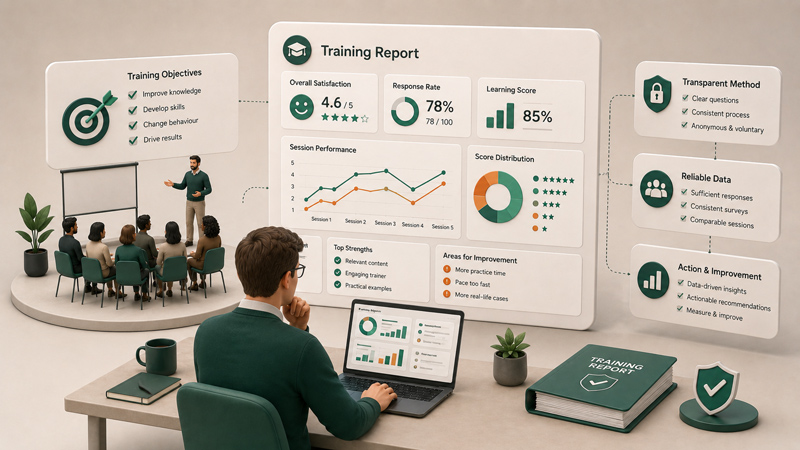
Feedback is only valuable when something happens after it is collected.
A customer submits a poor satisfaction score. A trainee says the session was unclear. An employee reports a workplace concern. A lead fills in a product interest form. A patient shares a service complaint. A participant gives a strong recommendation.
Each of these responses matters.
But if the response stays hidden inside a survey dashboard, nothing changes quickly. The support team may not see the complaint. The sales team may not receive the lead. The HR team may miss an important signal. The trainer may not know that a session needs improvement. The manager may only discover the issue when it is already too late.
That is the problem with disconnected feedback.
Collecting responses is not enough. Feedback needs to move.
That is why every feedback workflow needs automation.
Feedback should not stay trapped in a dashboard
Survey dashboards are useful. They help you view responses, analyse results, and understand trends. But a dashboard should not be the final destination for every piece of feedback.
Some feedback needs action immediately.
If a customer gives a very low satisfaction score, your team should know quickly. If someone reports a technical issue, support should receive it. If a lead requests a demo, sales should follow up. If a training participant reports confusion, the trainer should be able to respond or improve the next session. If an employee shares sensitive feedback, the right person should be alerted.
When feedback stays inside a dashboard, your team depends on someone remembering to check it.
That creates delays.
And in many cases, delayed feedback becomes less useful.
A customer who is unhappy today may not wait a week for your team to notice. A lead who is interested today may lose interest if sales follows up too late. A training issue discovered after several sessions may have already affected many participants.
Feedback becomes more powerful when it reaches the right people at the right time.
Automation makes that possible.
The problem with manual feedback handling
Many teams still manage feedback manually.
They collect survey responses, export them to a spreadsheet, copy important details into another tool, send internal messages, create tasks, update CRM records, or manually prepare reports.
This may work when response volume is low. But as soon as feedback becomes frequent, manual handling becomes a bottleneck.
Manual processes are slow. They depend on human memory. They are easy to forget. They create duplicate work. They increase the risk of errors. They also make it harder for teams to respond consistently.
For example, imagine that your customer success team runs an NPS survey every month. When someone gives a low score, someone needs to identify the response, copy the customer details, notify the account manager, and create a follow-up task.
If this is done manually, some responses may be missed.
Now imagine the same process automated. The moment a low score is submitted, the right team is notified, a task is created, and the customer record is updated.
That is a better workflow.
Automation does not replace human judgment. It removes the repetitive manual steps that prevent people from acting quickly.
What is feedback automation?
Feedback automation means that a survey response can automatically trigger an action.
Instead of waiting for someone to check the dashboard, export data, or send a message, the system can move the response to another tool or start a workflow.
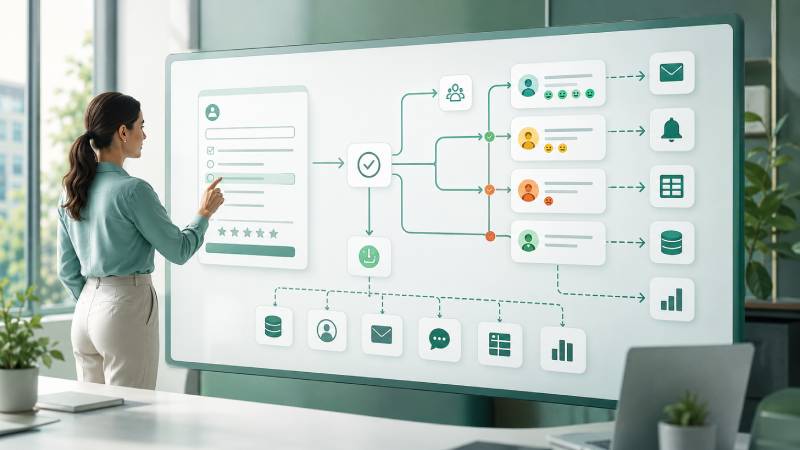
For example, a completed survey can automatically create a support ticket. A low rating can send a notification to a team. A lead form can update a CRM. A training evaluation can be sent to a reporting dashboard. A research response can be added to a spreadsheet or database. A customer comment can trigger a follow-up email.
This is how feedback becomes part of your business process.
Without automation, feedback is passive. It waits for someone to notice it.
With automation, feedback becomes active. It moves, alerts, updates, and triggers the next step.
That difference matters because modern teams work across multiple tools. Your survey platform may collect the response, but your team may work in a CRM, project management tool, support desk, email platform, spreadsheet, dashboard, or communication app.
Automation connects these tools.
Why Enquete uses Webhooks and Zapier
Enquete helps teams automate feedback workflows through webhooks and Zapier integrations.
These two options serve different types of users.
Webhooks are powerful for technical teams. They allow Enquete to send survey response data directly to another system when something happens, such as a new response submission. Developers can use webhooks to connect Enquete with internal systems, custom dashboards, CRMs, data warehouses, reporting tools, and business applications.
Zapier is useful for non-technical teams. It allows you to connect Enquete with other apps and build simple workflows without writing code. This means your team can automate common tasks without waiting for a developer every time.
Together, webhooks and Zapier give Enquete flexibility.
Your technical team can build deeper custom integrations. Your business team can create practical no-code automations. Your organisation can make feedback flow into the tools where work already happens.
That is important because not every automation requires a custom development project. Sometimes you only need a simple workflow: when a response is submitted, add a row to a spreadsheet, send a notification, or create a task.
Zapier helps with that.
But when your workflow is more advanced, webhooks give your developers the control they need.
Automation helps you respond faster
Speed matters in feedback.
When someone gives feedback, they are giving you a signal. The sooner your team receives that signal, the sooner you can respond.
This is especially important for negative feedback.
If a customer is unhappy, a fast response can protect the relationship. If a patient reports a poor experience, a quick follow-up can show that your organisation takes service quality seriously. If an employee shares a concern, a timely response can help prevent the issue from getting worse.
Automation reduces the delay between response and action.
Instead of waiting for someone to check results at the end of the week, the relevant team can be notified immediately or near immediately. This makes your organisation more responsive.
But speed is not only useful for negative feedback.
Positive feedback can also trigger action. A satisfied customer can be invited to leave a review. A promoter can be passed to a referral workflow. A strong training result can be shared with a client. A successful event feedback response can be used to support future marketing.
Automation helps you act on all types of feedback, not only complaints.
Automation reduces manual data entry
Manual data entry is one of the biggest wastes in feedback management.
If your team collects survey responses in one platform and then copies information into another system, you are spending time on work that can often be automated.
This creates several problems.
It slows your team down. It increases the chance of mistakes. It makes the process boring and repetitive. It also creates delays between feedback collection and follow-up.
For example, if someone completes a lead generation survey, the response may include their name, email address, company, interest, and budget. Without automation, someone may need to copy this information into a CRM manually.
With automation, the lead can be created automatically.
This saves time and improves accuracy.
The same applies to support tickets, internal tasks, spreadsheets, email lists, dashboards, and reporting tools.
When feedback data moves automatically, your team spends less time copying information and more time using it.
Automation improves team collaboration
Feedback often belongs to more than one team.
Customer feedback may be useful for support, product, sales, and marketing. Employee feedback may be useful for HR, management, and operations. Training feedback may be useful for trainers, HR teams, clients, and programme managers. Research feedback may be useful for analysts, project leads, and decision-makers.
If feedback stays in one platform, the right people may not see it.
Automation helps distribute feedback to the people who need it.
A low satisfaction score can notify customer success. A product complaint can be sent to the product team. A training issue can be shared with the trainer. A lead response can go to sales. A service complaint can create a task for operations.
This improves collaboration because feedback no longer depends on one person manually forwarding information.
It becomes part of the workflow.
That means fewer missed signals, faster internal communication, and clearer ownership.
When feedback reaches the right team automatically, people can respond with more confidence.
Automation makes feedback more consistent
Manual processes often become inconsistent.
One team member may follow up quickly. Another may forget. One department may update the CRM. Another may keep notes in a spreadsheet. One survey response may be escalated. Another similar response may be ignored.
This creates uneven experiences for customers, employees, participants, or stakeholders.
Automation helps standardise what happens after feedback is submitted.
For example, you can decide that every low rating should create a follow-up task. Every new lead should be added to the CRM. Every training evaluation should be sent to a reporting dashboard. Every completed survey should be stored in a central system.
This consistency helps your organisation become more reliable.
People should not receive different levels of follow-up simply because one response was noticed and another was missed.
Automation helps ensure that important feedback is handled in a predictable way.
Real-world examples of feedback automation
To understand the value of automation, it helps to look at practical examples.
Imagine you run customer satisfaction surveys after support interactions. When a customer gives a low score, Enquete can send that response to your support system or notify the customer success team. This allows the team to follow up quickly before the customer becomes more frustrated.
Imagine you use Enquete for lead generation. A prospect completes a survey or form and indicates interest in your service. Through automation, the response can create a CRM contact, assign the lead to sales, and trigger a follow-up email.
Imagine you deliver training sessions. After participants submit their evaluations, the results can be sent to an internal dashboard or reporting system. If a session receives low ratings, the training manager can be notified.
Imagine you run employee feedback surveys. If someone submits feedback that requires attention, the right HR person can be alerted or a task can be created for review.
Imagine you run research projects. Every completed survey response can be sent to a spreadsheet, database, or analysis system without manual export.
In each case, automation turns feedback into movement.
It makes sure responses do not sit quietly in one place.
Webhooks give technical teams control
For technical teams, webhooks are one of the most flexible ways to connect systems.
A webhook allows Enquete to send data to another system when an event happens. In the context of feedback, that event might be a new survey response.
This is useful when your organisation has custom systems or specific workflows.
You may want responses sent to an internal dashboard. You may want survey data stored in your own database. You may want to trigger an internal business process. You may want to connect feedback with a CRM, data warehouse, reporting system, or customer platform.
Webhooks make this possible.
The advantage is flexibility. Your developers can decide where the data goes and what should happen next. This gives your organisation more control over how feedback fits into your systems.
For growing companies, this matters.
As your feedback operations become more advanced, you may need more than basic exports. You may need direct connections between Enquete and the systems that power your business.
Webhooks help make that connection.
Zapier gives non-technical teams speed
Not every team has developers available for every small automation.
Sometimes you need a simple workflow, and you need it quickly.
That is where Zapier is useful.
With Zapier-supported workflows, non-technical users can connect Enquete to other tools without writing code. This gives business teams more independence.
For example, you may want to send a message to a team channel when a survey is completed. You may want to add a new response to a spreadsheet. You may want to create a task in a project management tool. You may want to add a contact to an email list. You may want to trigger a follow-up workflow.
Zapier can help make these everyday automations easier.
This is valuable because it reduces dependency on technical teams. Instead of waiting for a developer to build every small integration, business users can create useful workflows themselves.
That makes your feedback process faster and more adaptable.
Automation helps you close the feedback loop
Collecting feedback is not the same as closing the feedback loop.
Closing the loop means that feedback leads to a response, decision, improvement, or follow-up action.
Many organisations collect feedback but fail to close the loop. They ask people for opinions, but nothing visible happens afterward. Over time, people stop responding because they feel their feedback does not matter.
Automation helps prevent this.
When feedback automatically triggers follow-up, your organisation becomes more responsive. Customers feel heard. Employees feel that their input matters. Participants see that evaluation is taken seriously. Teams can act faster on the information they receive.
This strengthens trust.
People are more likely to give feedback when they believe something will happen with it.
Automation helps you prove that feedback is not just collected for reporting. It is used for action.
Automation makes Enquete more than a survey tool
A basic survey tool helps you ask questions.
Enquete helps you turn answers into action.
That is an important difference.
With webhooks and Zapier integrations, Enquete becomes part of your wider business workflow. It can support sales, support, HR, training, research, operations, customer success, product management, and reporting.
Your survey is no longer isolated.
It becomes connected to the systems your team already uses.
This is what modern feedback requires. Organisations do not need more disconnected dashboards. They need feedback that moves through the business and supports decisions.
Enquete is built for that kind of workflow.
It helps you collect feedback, understand responses, and connect the results to action.
Who needs feedback automation?
Feedback automation is useful for any team that collects responses and needs to act on them.
If you are a SaaS company, automation can help connect product feedback, customer satisfaction, and lead generation to your internal tools. If you are a support team, it can help turn complaints or low scores into follow-up tasks. If you are a customer success team, it can help identify at-risk customers faster.
If you are an HR team, automation can help route employee feedback to the right people. If you are a training provider, it can help connect session feedback to reporting and improvement workflows. If you are a researcher, it can help move response data into analysis tools. If you are an agency, it can help manage client feedback and reporting more efficiently.
The more feedback you collect, the more valuable automation becomes.
Manual processes may work at the beginning. But as your audience grows, your surveys increase, and your workflows become more complex, automation becomes essential.
Conclusion
Feedback loses value when it arrives late, stays isolated, or depends on manual follow-up.
If someone takes the time to respond to your survey, that response should be able to trigger the right next step. It should reach the right team. It should update the right system. It should support the right decision.
That is why every feedback workflow needs automation.
With Enquete Webhooks and Zapier integrations, you can connect survey responses to the tools and processes your organisation already uses. You can reduce manual work, respond faster, improve collaboration, and turn feedback into real business action.
A survey response should not be the end of the process.
It should be the beginning of the next action.
Use Enquete.com to automate your feedback workflows and make every response move where it matters most.