A survey response is only useful when it reaches the systems and people that need it.
For many organisations, collecting responses is not the main problem. The real difficulty is what happens after someone submits the survey.
A customer may report a serious problem. A training participant may give a very low score. A prospect may request contact. An employee may raise an issue that needs attention. A respondent may provide information that should update an internal record.
If that data remains inside the survey dashboard, someone must notice it, copy it, and move it into another system manually.
That creates delay.
It also creates a weak point in the process. Important information can be overlooked, transferred incorrectly, or handled too late.
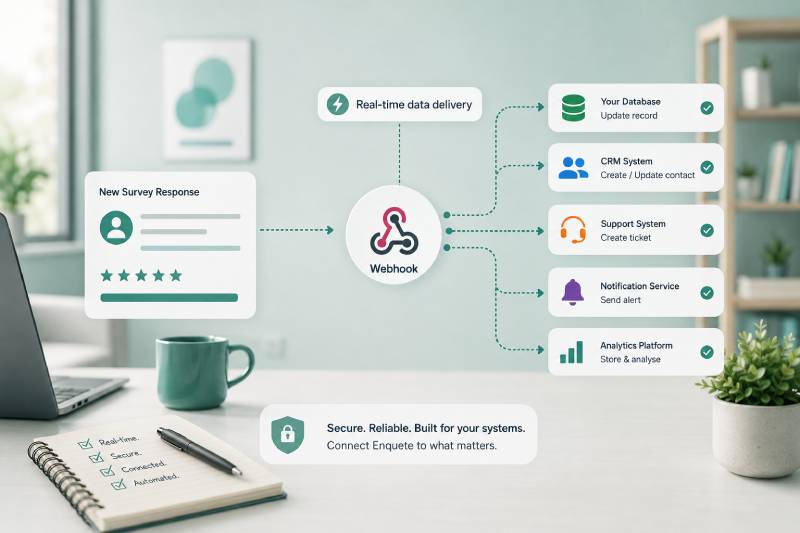
Survey webhooks provide a way to solve this problem by sending survey event data directly from Enquete to another application when a specific event occurs.
For organisations with developers, internal software, or custom workflows, webhooks can turn survey responses into real-time operational events rather than static records waiting to be reviewed.
But webhooks are not the right solution for every integration.
They offer greater control than many no-code tools, but they also require more technical responsibility. Before using them, it is important to understand how they work, what they are good at, and what your organisation must be prepared to manage.
What Is a Survey Webhook?
A webhook is a way for one application to send information automatically to another application when something happens.
In the context of Enquete, the event might be a new survey response or a completed survey response.
When the configured event occurs, Enquete sends a request containing the relevant survey data to a web address provided by your organisation. This address is called a webhook endpoint.
The receiving system then decides what to do with the data.
It may store the response in a database, update a customer record, create a support case, start an internal workflow, send a notification, or perform another action defined by your developers.
This is different from asking the receiving application to check Enquete repeatedly for new information.
With a webhook, Enquete sends the event when it happens.
That makes webhooks especially useful for workflows where speed matters.
A customer complaint can enter a support process shortly after submission. A sales enquiry can be passed into an internal lead-management system. A training evaluation can update an organisation’s reporting platform. A custom application can react to a completed survey without waiting for a manual export.
The webhook acts as the connection between the survey event and the next system in the workflow.
How Survey Webhooks Work
A webhook workflow begins with a trigger.
The trigger is the event in Enquete that causes information to be sent. Depending on the available configuration, this could be when a new response is created or when a survey response is completed.
Your organisation provides the endpoint where Enquete should send the data.
When the event occurs, Enquete makes an HTTP request to that endpoint. The request contains a payload with information about the survey event and response.
The receiving application processes that payload according to its own rules.
For example, it may check the survey identifier, read the respondent’s answers, identify a low satisfaction score, and create a case for the customer-success team.
The receiving system then returns an HTTP response.
A successful response usually falls within the 200–299 status-code range. This tells Enquete that the receiving system accepted the delivery.
When the endpoint returns an error, times out, or is unavailable, the delivery may be recorded as failed. The integration owner can then investigate what happened.
This process may sound simple, but a reliable webhook implementation requires more than creating a URL and accepting incoming data.
The receiving system must verify requests, handle errors, prevent duplicate processing, and respond quickly enough for deliveries to be completed successfully.
Why Use Webhooks Instead of Manual Exports?
Manual exports are useful for reporting, one-time analysis, and occasional data transfers.
They are much weaker when a business process depends on immediate action.
Suppose an organisation runs a customer-satisfaction survey after every support interaction. Once a week, a manager exports the responses and reviews the lowest scores.
That process may identify problems eventually, but it does not support fast recovery.
A customer who gives a very poor score on Monday may not be contacted until Friday. By that time, they may already have escalated the issue, cancelled the service, or decided that the organisation does not take feedback seriously.
A webhook can send the completed response into the support process shortly after it is submitted.
The same principle applies to many other workflows.
A potential customer who requests a demonstration should not wait for someone to export survey results. A serious internal concern should not remain hidden until the next reporting cycle. A registration form may need to update an operational system immediately.
Webhooks reduce the gap between collection and action.
They also reduce repetitive work. Once the integration is operating correctly, the same process can run consistently for every qualifying event.
When Webhooks Are the Right Choice
Webhooks are most valuable when Enquete needs to connect directly to a system that your organisation controls or when the workflow requires logic that a standard integration cannot easily provide.
One common situation is integration with an internal application.
Your organisation may have its own CRM, customer portal, training platform, case-management system, or reporting solution. That application may not be available in a no-code integration marketplace.
A webhook gives your developers a direct way to receive Enquete events and connect them to your internal system.
Webhooks are also useful when the process includes custom business rules.
For example, your application may need to compare the response with existing customer data, determine whether a support case already exists, calculate a risk score, and route the case based on the customer’s contract level.
That kind of logic may be too specialised for a simple automation workflow.
Another strong use case is when your organisation wants control over how the data is stored and processed.
With a direct webhook integration, your developers can validate the incoming data, remove fields that are not needed, transform the payload, apply internal access rules, and decide exactly how the information enters your infrastructure.
Webhooks are therefore a good fit when flexibility, direct system control, or custom processing matters more than ease of setup.
When Webhooks May Be Unnecessary
Webhooks are powerful, but that does not mean they should be the default choice.
If your organisation only needs to send responses to a common application, create a straightforward task, update a spreadsheet, or send a notification, a no-code tool such as Zapier may be faster and easier to maintain.
Building a custom webhook integration for a simple workflow can introduce unnecessary complexity.
Someone must develop the endpoint, host it, secure it, monitor it, and maintain it. Changes in the receiving application may require code updates. Failed deliveries must be investigated. Logs must be retained and reviewed.
A technically impressive integration is not automatically a good business decision.
The correct question is not, “Can we build this with a webhook?”
The better question is, “Does this workflow justify custom development and ongoing maintenance?”
If a simple automation platform can handle the process reliably, using a webhook may be excessive.
Webhooks are most valuable when their additional flexibility solves a real requirement.
Practical Ways to Use Enquete Webhooks
One of the strongest uses for survey webhooks is customer support.
A response with a low satisfaction score can be sent to an internal support system. The receiving application can create a case, attach the survey answers, identify the customer, and assign the issue to the appropriate team.
This helps the organisation respond before the customer is forced to complain again.
Sales workflows are another practical use.
A respondent may indicate interest in a product, request a demonstration, or ask to be contacted. The webhook can send that information into a custom sales platform where the lead can be qualified and assigned.
Webhooks can also support training and education.
A completed evaluation can update a training record, calculate an average score, store the participant’s feedback, or trigger a review when the result falls below an internal standard.
For event management, a registration response can update an attendee database, reserve a place, generate an internal confirmation record, or notify the event team when a special request is submitted.
Internal applications can also use webhooks to synchronise survey data with existing records.
A customer profile may be updated with a new satisfaction score. A project record may receive a completed assessment. A compliance system may store evidence that a required questionnaire was completed.
The value of the webhook is not in the transfer alone.
Its value comes from what the receiving system can do immediately after the event arrives.
Webhooks and Real-Time Processing
Webhooks are often described as real-time integrations.
That description is useful, but it should not be interpreted as an absolute guarantee of instant processing.
A webhook is event-driven. Enquete sends the request when the configured event occurs. This usually allows the receiving system to react much faster than a manual export or scheduled review.
However, the final speed still depends on several factors.
The receiving server must be available. The endpoint must respond quickly. Network issues can create delays. The application may place the event in a queue before processing it. Internal business logic may take additional time.
The better term is often near-real-time.
The data can move quickly, but a reliable integration should be designed to handle temporary failures and processing delays.
This matters because organisations sometimes build a workflow that assumes every webhook will be delivered once, immediately, and in perfect order.
That assumption is dangerous.
A production-ready system should expect occasional retries, duplicate deliveries, unavailable services, and unusual timing.
Securing Your Webhook Endpoint
A webhook endpoint is a public address that receives data from another system.
That means security cannot be treated as an optional extra.
Your receiving application should verify that incoming requests genuinely came from Enquete.
One way to support this is through a webhook secret and request signature. The receiving system can use the secret to validate the signature included with the request.
This helps prevent an attacker from sending fabricated requests to your endpoint and pretending they came from Enquete.
The secret should be stored securely.
It should not be committed to a public code repository, placed in client-side JavaScript, shared in screenshots, or sent through unsecured communication channels.
The endpoint should also use HTTPS.
HTTPS encrypts the connection between Enquete and the receiving server, helping protect the survey data while it is being transferred.
Access to delivery logs and payloads should be restricted as well. Survey responses may contain names, email addresses, comments, customer information, or other personal data.
Your organisation should transfer only the information needed for the workflow and retain it only for as long as necessary.
Security should be designed into the integration from the beginning, not added after the system is already live.
Handling Duplicate Deliveries
A webhook receiver should never assume that each event will arrive only once.
A delivery may be retried when the original request times out or when the receiving server returns an error. In some situations, the first request may have been processed successfully even though Enquete did not receive a successful response.
This can lead to duplicate deliveries.
If the receiving application processes every delivery as a new event, it may create duplicate CRM contacts, support cases, tasks, notifications, or database records.
To prevent this, the receiving system should use the delivery identifier to recognise events it has already processed.
The X-Enquete-Delivery header can be used as an idempotency key.
Idempotency means that processing the same event more than once produces the same result as processing it once.
The application can store the delivery identifier after successful processing. When the same identifier arrives again, it can ignore the duplicate or return a success response without repeating the business action.
This is a small technical detail with major operational consequences.
A webhook integration that does not handle duplicates may appear to work during testing but create serious data-quality problems in production.
Responding Quickly to Webhook Requests
The receiving endpoint should acknowledge the webhook as quickly as possible.
A common mistake is to perform all business processing before returning a response.
For example, the endpoint may receive the webhook, call several internal services, update multiple databases, generate a report, send emails, and wait for every task to finish before responding.
That makes the endpoint slow and increases the chance of a timeout.
A stronger architecture is to validate the request, store or queue the event, and return a successful response promptly.
The heavier processing can then continue in the background.
This design is more resilient.
It separates delivery from business processing. Enquete receives confirmation that the event was accepted, while the receiving application can retry internal operations independently if something later fails.
This approach is especially important for systems that may receive many survey events within a short period.
The webhook endpoint should remain lightweight and predictable.
Monitoring Webhook Deliveries
A webhook should not be treated as a system that can be configured once and forgotten.
Endpoints can fail. Credentials can change. Certificates can expire. Applications can be redeployed incorrectly. Database dependencies can become unavailable. Code updates can introduce defects.
Without monitoring, the integration may stop working while everyone assumes survey data is still flowing normally.
Enquete’s webhook delivery logs help users inspect successful and failed deliveries.
The logs can show information such as the event, delivery status, HTTP response, processing duration, payload, error message, and delivery identifier.
This information is valuable when diagnosing problems.
A 404 response may indicate that the endpoint URL is incorrect. A 401 or 403 response may point to an authentication or signature-validation problem. A 500 response suggests that the receiving application encountered an internal error. A timeout may indicate that the endpoint is responding too slowly.
The integration owner should review failed deliveries and define an operational process for handling them.
A failed webhook is not merely a technical issue. It may mean that an important customer complaint, lead, registration, or internal report did not reach the intended system.
Testing Before Going Live
A webhook should be tested with more than one ideal response.
The first test should confirm that Enquete can reach the endpoint and that the endpoint returns a successful HTTP status.
After that, the receiving application should be tested with different payloads and conditions.
What happens when an optional field is missing? What happens when a comment is empty? Can the system process special characters? Does it handle large responses? Does it reject an invalid signature? What happens when the same delivery is sent twice?
You should also test failure scenarios.
Temporarily return an error and confirm that it appears in the delivery logs. Make the endpoint slow and observe how timeouts are handled. Disconnect an internal dependency and confirm that the event is not silently lost.
A webhook integration is not ready because one sample request succeeded.
It is ready when the expected failure cases have been considered and the system behaves predictably.
Webhooks Do Not Replace Workflow Design
A webhook can move data quickly, but it cannot decide whether the process around that data makes sense.
Suppose a low satisfaction score creates a case in your internal system.
Who owns the case? How quickly must they respond? What information do they need? How is the customer contacted? When is the case considered resolved? What happens when the same customer submits another response?
Those are workflow questions, not webhook questions.
The integration can trigger the process, but your organisation must still define the process.
Without clear ownership, the webhook may create records that nobody reviews. Without sensible rules, it may create too many cases. Without proper filtering, it may transfer sensitive information unnecessarily.
The technology should support a well-defined operational decision.
Before implementing a webhook, identify the exact event, the receiving system, the required data, the expected action, and the person responsible for the outcome.
If those elements are unclear, the integration is not ready to be built.
Conclusion
Survey webhooks allow Enquete to send event data directly to another application when something important happens.
They can help customer problems reach support systems faster, send qualified prospects into sales workflows, update internal records, trigger custom business logic, and connect survey responses with applications that are not available through standard integrations.
Their main strength is control.
Your organisation decides how the request is validated, how the data is transformed, where it is stored, and what action follows.
That control comes with responsibility.
The endpoint must be secured, duplicate deliveries must be handled, failures must be monitored, and the receiving application must be designed to process events reliably.
Webhooks are therefore best suited to organisations that have a genuine need for custom integration and the technical capacity to maintain it.
When the workflow is simple, Zapier may be the more practical choice. When the workflow is specialised, business-critical, or deeply connected to your own software, webhooks can provide the flexibility you need.
The strongest integration is not the most technical one.
It is the one that moves the right information into the right system and triggers a clearly defined action when the response still matters.