Creating a survey is usually the easy part.
The real work often begins after people start responding.
Someone may need to copy the results into a spreadsheet. Another person may have to send an email to the respondent. A sales representative may need to create a new contact in a CRM. A support team may need to investigate a complaint. A training manager may have to review a poor evaluation score. At the end of the month, someone may still need to combine all the information into a report.
These tasks may seem small when handled individually. But when responses begin to accumulate, the manual work grows quickly.
It also introduces delays.
A valuable response can remain unnoticed because nobody checked the survey dashboard. A potential customer may not be contacted while their interest is still high. A dissatisfied customer may wait several days before receiving help. Information may be copied incorrectly or entered twice into another system.
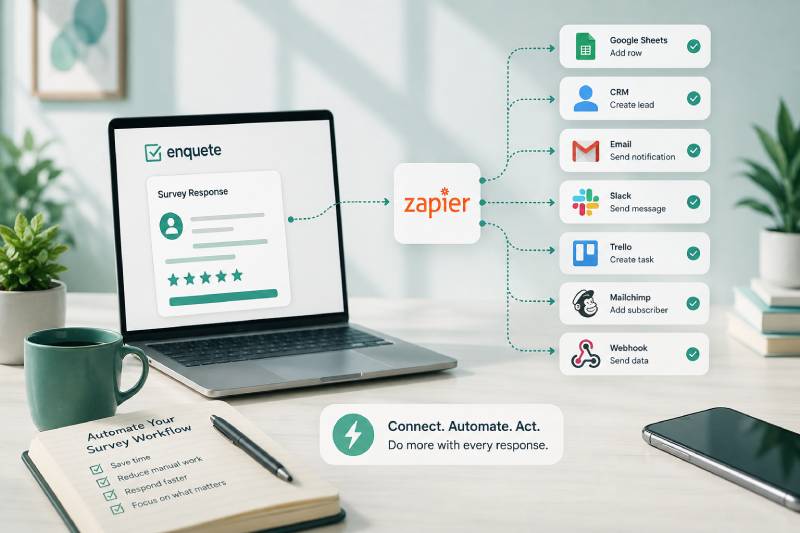
Zapier helps reduce this manual workload by connecting Enquete to the other applications your organisation already uses.
When a relevant event occurs in Enquete, Zapier can start an automated workflow. The survey response can be moved to another application, a notification can be sent, a record can be created, or a follow-up task can be assigned without requiring someone to perform every step manually.
The purpose is not to automate work simply because automation is available. The purpose is to remove repetitive steps, improve response times, and make sure important feedback leads to action.
Here are seven practical ways your organisation can automate its survey workflow with Enquete and Zapier.
1. Send Survey Responses to a Spreadsheet Automatically
Spreadsheets remain one of the most common tools for storing, reviewing, and sharing survey data.
Many organisations use Google Sheets or another spreadsheet application to combine survey responses with operational information. A training provider may maintain a sheet containing course dates, participant details, attendance records, and evaluation scores. A marketing team may use a spreadsheet to track research responses. An event organiser may use one to manage registrations and participant preferences.
Without automation, someone has to export the survey results or copy new responses into the spreadsheet manually.
That process may work when a survey receives only a few responses. It becomes inefficient when responses arrive regularly or from multiple surveys.
With Zapier, a completed Enquete response can automatically create a new row in the appropriate spreadsheet. The respondent’s details, answers, score, submission date, and other relevant information can be placed into predefined columns.
This gives your team an updated working document without requiring repeated exports.
It also helps prevent inconsistencies. When employees copy data manually, names may be entered differently, fields may be omitted, and values may be placed in the wrong columns. An automated workflow uses the same mapping for every response.
However, sending every answer into a spreadsheet is not always the best approach. A poorly designed sheet can quickly become crowded and difficult to understand. Before setting up the automation, decide which data the team genuinely needs and how it should be organised.
The goal should be a usable operational record, not simply another destination where raw survey data accumulates.
2. Create and Update Leads in Your CRM
Surveys and forms often collect more than feedback.
They can also identify potential customers.
A product-interest form may ask which service a respondent needs. A registration form may collect company details. A market-research survey may reveal that someone is actively looking for a solution. A consultation request may include the respondent’s budget, timeline, or preferred contact method.
When this information remains inside a survey dashboard, the sales team may not see it quickly enough.
Zapier can move qualified respondents from Enquete into a customer relationship management system. Depending on the workflow, it may create a new contact, add a lead, update an existing customer record, or attach the survey information to the appropriate profile.
This removes the need for a marketer or administrator to transfer the details manually.
More importantly, it can shorten the time between expressed interest and sales follow-up.
A prospect who requests a demonstration is more valuable at the moment they submit the request than several days later. Their need is current, and they may already be comparing providers. Automatically creating the lead allows the sales team to begin its normal follow-up process sooner.
The automation should still include sensible qualification rules.
Not every person who completes a survey is a sales lead. Sending every respondent into your CRM can fill the system with low-quality records and make it harder for the team to focus on genuine opportunities.
A stronger workflow may send a respondent to the CRM only when they select a particular answer, request contact, meet a qualification threshold, or express interest in a product.
Automation is most useful when it improves the quality of the workflow, not just the speed at which data is transferred.
3. Notify the Right Person When Important Feedback Arrives
Some survey responses should not wait for a weekly report.
A low customer-satisfaction score may indicate that a relationship is at risk. A participant may report an accessibility problem during an event. A trainee may describe a serious issue with a course. An employee may request follow-up. A customer may specifically ask to be contacted.
If nobody checks the survey dashboard immediately, the response may remain unseen.
Zapier can send a notification when a qualifying response arrives. That notification could be delivered by email, messaging software, or another communication tool used by your organisation.
The important word is qualifying.
Sending a notification for every response usually creates noise. When employees receive too many alerts, they begin to ignore them. The workflow then becomes less useful than the manual process it was meant to replace.
Notifications should therefore be reserved for responses that require awareness or action.
For example, an organisation could trigger an alert when a satisfaction score falls below a defined threshold. A training provider could notify the programme manager when a participant selects “very dissatisfied.” A sales team could receive an alert when someone requests pricing information. A support manager could be informed when a respondent indicates that an issue remains unresolved.
The notification should also contain enough context to support a decision.
A message that only says “a new response was received” still forces the recipient to search for the relevant information. A better alert includes the survey name, important answers, respondent details where appropriate, and a clear indication of why the response triggered the workflow.
The objective is not merely to notify someone faster. It is to help the right person understand what happened and decide what to do next.
4. Create Follow-Up Tasks Automatically
Awareness does not guarantee action.
A team member may read a notification and intend to respond later. The message may then disappear among other emails or conversations. Without clear ownership, everyone may assume that someone else is handling the issue.
Creating a task makes the follow-up more concrete.
Zapier can use an Enquete response to create a task in a project-management, support, or work-management system. The task can include the relevant response details, a due date, a priority level, and the person or team responsible for the next step.
For example, a negative customer review could create a task for the customer-success team. A request for a product demonstration could create a sales follow-up task. Feedback about a training module could create a content-review task for the trainer. A reported event problem could be assigned to the operations manager.
This turns feedback into accountable work.
Instead of remaining as an observation inside a report, the response becomes part of the system your team already uses to manage responsibilities.
The workflow should still be designed carefully.
If every response creates a task, the team may receive hundreds of low-value assignments. Tasks should be created only when there is a clear action to perform.
It is also important to define completion.
A task such as “review feedback” is vague and difficult to measure. A stronger task may be “contact the customer within one business day,” “investigate the reported issue,” or “review the training material before the next session.”
Automation can create the task, but your organisation must decide what successful follow-up actually looks like.
5. Add Respondents to the Right Email Workflow
Survey responses can reveal what people need, what they are interested in, and what information should be sent next.
A respondent may ask to receive a report. A participant may register for a future event. A prospect may request product information. A customer may indicate interest in a particular feature. A training attendee may need a certificate, follow-up material, or a reminder about another session.
Zapier can use this information to add the respondent to an appropriate email workflow or mailing list.
This can make follow-up more relevant.
Instead of sending the same generic message to everyone, your organisation can use survey answers to determine what communication should follow. A respondent interested in customer-experience surveys could enter a different campaign from someone interested in training evaluations. An event participant could receive practical attendance information. A customer who asks for assistance could receive a confirmation that their request has been received.
The danger is treating every collected email address as permission for marketing.
A respondent completing a survey has not automatically agreed to receive promotional messages. Your automation must respect the consent the person actually provided, as well as the privacy and email-marketing rules that apply to your organisation.
Operational communication and marketing communication should also be distinguished.
Sending a requested report or confirming a registration is different from subscribing someone to an ongoing promotional campaign. The workflow should reflect that difference.
When used responsibly, this type of automation can make communication faster and more relevant. When used carelessly, it can damage trust and create compliance problems.
6. Route Customer Problems into Your Support Process
Feedback surveys often reveal problems before customers contact support directly.
A respondent may say that an issue was not resolved. They may report difficulty using a product. They may explain that a service did not meet expectations. They may give a low score and describe the reason in an open-text answer.
If this information remains only in the survey results, the support team may never see it.
Zapier can transfer qualifying responses into your existing support process. A response could create a ticket, add information to an existing customer record, or notify the team responsible for investigating the issue.
This allows the organisation to treat the survey as an early-warning system.
Instead of waiting for the customer to complain again, the team can follow up proactively. That can be particularly valuable when a customer is dissatisfied but has not yet decided to cancel or escalate the matter.
The workflow should include enough information for the support team to act.
A ticket containing only a satisfaction score is rarely sufficient. The support agent may need the respondent’s contact details, the survey answers, the relevant product or service, the date of the interaction, and any comments explaining the problem.
At the same time, only necessary information should be transferred. Survey responses may contain personal or sensitive details, and they should not be distributed across systems without a legitimate operational reason.
It is also important to avoid duplicate cases.
A customer may have already contacted support about the same issue. Creating another ticket without checking existing records can confuse both the team and the customer. Depending on the tools and workflow available, the automation may need to update an existing record rather than create a new one every time.
Automation can help your team respond faster, but it must fit into a disciplined support process.
7. Trigger Different Actions Based on Survey Answers
The most valuable automations are often not based solely on the fact that a response was received.
They are based on what the respondent actually said.
Different answers may require different actions.
A high satisfaction score may lead to a request for a testimonial. A low score may create a customer-recovery task. A respondent who asks for more information may be sent to the sales team. Someone who selects a particular service may enter a relevant follow-up campaign. A training participant who fails a knowledge check may receive additional learning material.
Zapier can support workflows where particular answers, scores, or conditions determine what happens next.
This makes the automation more intelligent than simply copying every response into another application.
Consider a post-training evaluation.
A participant who rates the session highly and confirms that the learning objectives were achieved may require no immediate intervention. A participant who gives a very low score and explains that the material was unclear may need follow-up. If several participants identify the same problem, the training manager may need to revise the course before the next session.
The automation could therefore route low scores to a review process while allowing ordinary responses to remain in Enquete for reporting.
This selective approach prevents unnecessary work.
It also helps teams focus on the responses that contain the strongest opportunities, risks, or requests for assistance.
The rules must still be tested carefully. A numeric score without context can be misleading. A respondent may select an average rating but describe a serious problem in an open comment. Another person may select a low rating by mistake.
Automation should support human judgement, not eliminate it entirely.
Design the Workflow Before You Automate It
Zapier can make survey workflows faster, but it cannot repair a process that has never been clearly defined.
Before creating a Zap, write down what currently happens after a response is submitted.
Who checks the response? Which answers matter? Where is the information copied? Who is expected to act? How quickly should they respond? What happens when the automation fails? How will the team know that the required action was completed?
These questions expose weaknesses that may otherwise be hidden by the technology.
For example, creating a CRM lead is pointless when no salesperson is responsible for reviewing new leads. Sending an urgent notification is ineffective when the message goes to a channel nobody monitors. Creating a task does not help when it has no deadline or owner.
A reliable automation needs a clear trigger, a useful action, defined ownership, and a way to confirm that the workflow is functioning.
Start with one process that is repetitive, slow, or regularly forgotten.
Build the simplest version of the workflow and test it with sample responses. Confirm that the correct event triggers the Zap, the fields are mapped properly, and the destination receives usable information. Test different answer combinations, missing values, duplicate submissions, and unusual responses.
You should also decide what happens when the automation does not run successfully.
Automation reduces manual work, but it does not remove the need for monitoring. Someone should still be responsible for checking that important workflows continue to operate as expected.
Once the first automation is stable and useful, you can expand it or create additional workflows.
Conclusion
Survey data becomes more valuable when it moves beyond the survey dashboard and enters the systems where your organisation already works.
With Enquete and Zapier, a completed response can update a spreadsheet, create a CRM lead, notify a team member, assign a follow-up task, start an email workflow, create a support case, or trigger different actions based on the answers provided.
These automations can reduce repetitive work and help your organisation respond more quickly.
But the technology is not the strategy.
A Zap should not exist merely because two applications can be connected. It should solve a specific operational problem. It should remove a genuine delay, reduce avoidable manual work, improve accountability, or help the right team act on important feedback.
The most effective approach is to begin with one workflow where slow follow-up already has a visible cost.
Define the response that matters. Decide what should happen next. Assign responsibility. Test the automation properly. Then measure whether the process becomes faster and more reliable.
When those foundations are in place, Enquete and Zapier can help transform a survey response from static information into timely, practical action.