Connecting Enquete to another application can make your survey workflow faster, more reliable, and easier to manage.
But choosing the wrong integration method can create unnecessary cost, technical debt, or operational complexity.
Some organisations choose webhooks because they sound more advanced, even though a simple Zapier workflow would solve the problem. Others rely on a no-code automation when the workflow actually requires deeper control, stronger validation, or custom business logic.
The result is often an integration that works at first but becomes difficult to maintain.
Zapier and webhooks can both move survey data from Enquete into other systems. They can both reduce manual work. They can both trigger follow-up actions when a survey response is received.
But they are not interchangeable.
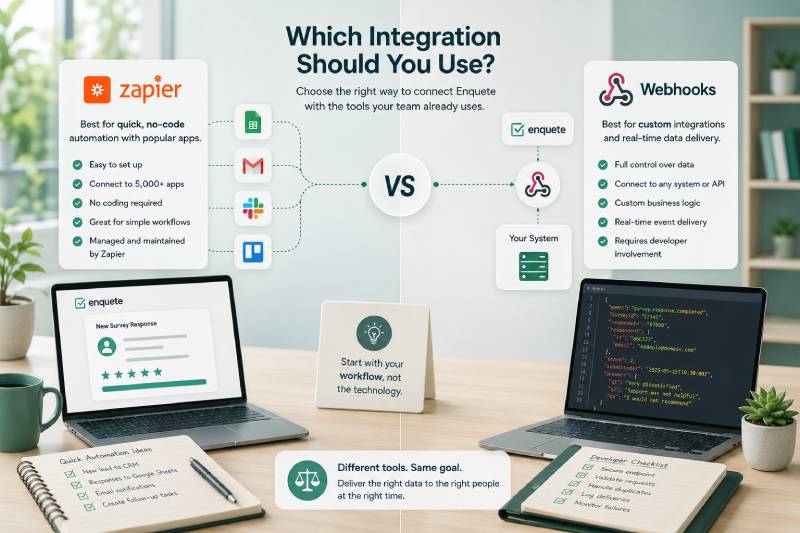
Zapier is generally designed for faster, no-code automation between commonly used applications. Webhooks are designed for direct, custom integrations where developers need more control over how data is received and processed.
The right choice depends on the workflow you are trying to build, the systems involved, the technical resources available, and the consequences if something goes wrong.
Start with the Workflow, Not the Technology
The biggest mistake is choosing the integration method before clearly defining the problem.
A team may decide that it needs a webhook because webhooks are flexible. Another may immediately choose Zapier because it is easier to configure.
Neither decision is strong if the underlying workflow is still vague.
Before selecting an integration method, identify what should happen after a survey event occurs.
Does a completed response need to create a row in Google Sheets? Should a low satisfaction score generate a support ticket? Does a qualified respondent need to become a CRM lead? Should the response update a custom internal system? Does your application need to apply complex rules before deciding what to do?
These questions determine the technical requirement.
A straightforward workflow often does not need custom development. A highly specialised workflow may be too important or too complex to place inside a generic no-code automation.
The integration method should follow the business requirement.
It should never be chosen simply because one option appears more modern, more technical, or easier to demonstrate.
What Is Zapier?
Zapier is an automation platform that connects different applications without requiring users to write code.
A Zapier workflow starts with a trigger.
The trigger is the event that begins the automation. In Enquete, this could be a new or completed survey response.
The workflow then performs one or more actions in other applications.
A response could be added to a spreadsheet, a lead could be created in a CRM, a notification could be sent, a task could be assigned, or a respondent could be added to an appropriate email workflow.
The main strength of Zapier is accessibility.
A business user, marketer, trainer, researcher, or operations manager may be able to create and maintain a useful integration without waiting for a development team.
Zapier also provides ready-made connections to many widely used business applications. That makes it practical for organisations that want to connect Enquete to tools already used by their teams.
However, Zapier is not completely effortless.
The workflow still needs to be designed correctly. Fields must be mapped. Conditions must be tested. Duplicate actions must be considered. Failed runs must be monitored. The organisation must also understand how usage limits and pricing may change as automation volume grows.
Zapier removes much of the coding burden, but it does not remove the need for disciplined workflow design.
What Is a Webhook?
A webhook allows Enquete to send survey event data directly to an endpoint controlled by another system.
When the configured event occurs, Enquete sends an HTTP request containing the relevant data. The receiving application then validates the request, processes the payload, and performs the required action.
The destination may be an internal CRM, a custom customer portal, a proprietary reporting platform, a case-management system, or another application developed specifically for the organisation.
The main strength of webhooks is control.
Developers can decide exactly how the incoming data should be validated, transformed, stored, routed, and combined with other systems.
A webhook can support business rules that may be difficult to express inside a standard no-code workflow.
For example, the receiving application may need to identify the customer, check whether an open support case already exists, calculate a risk score, route the case according to contract level, and write an audit record.
That level of processing usually requires custom code.
Webhooks also create a more direct connection between Enquete and the receiving system. The data does not need to pass through an automation platform before reaching the destination.
But this control comes with responsibility.
Your organisation must build and host the endpoint, secure it, validate signatures, handle duplicate deliveries, process failures, monitor logs, and maintain the code over time.
A webhook is not merely a technical feature. It is a small integration system that someone must own.
When Zapier Is the Better Choice
Zapier is usually the better option when the workflow is simple, the destination application is already supported, and speed of implementation matters.
Suppose you want every completed survey response to create a new row in Google Sheets.
Building a custom webhook service for this would be excessive. Your team would need to develop an endpoint, handle authentication, transform the payload, call the spreadsheet API, deploy the service, and maintain it.
Zapier can perform the same workflow with far less effort.
The same applies when you want to create a task, add a CRM contact, send a notification, update a mailing list, or move information into another standard business application.
Zapier is particularly useful when the people responsible for the workflow are not developers.
A marketing team may want to send interested respondents into a CRM. A trainer may want low evaluation scores to create review tasks. An event organiser may want registrations added to a spreadsheet.
These teams can often configure and adjust their own automations without entering a development backlog.
Zapier is also useful for testing an idea.
Before investing in a custom integration, your organisation can create a simple workflow and observe whether it produces enough value. If the process proves important and later requires more control, it can be rebuilt using webhooks.
This makes Zapier a strong starting point for many operational automations.
When Webhooks Are the Better Choice
Webhooks become more appropriate when the workflow must connect with custom software or requires logic that cannot be handled cleanly through a no-code platform.
An organisation may have an internal application that is not available in Zapier. It may also need to process survey responses according to proprietary rules.
For example, a healthcare provider may need to route responses according to service location and case type. A training platform may need to attach survey results to an existing participant record. A customer-success system may need to compare a new satisfaction score with previous scores before creating an escalation.
A webhook gives developers full control over these decisions.
Webhooks are also a better fit when data governance is a major concern.
Your organisation may want to minimise the number of external platforms involved in processing survey data. A direct webhook can send the data from Enquete to your own system without using a third-party automation service as an intermediary.
This does not automatically make the integration more secure. Your own endpoint must still be built and operated correctly. But it gives your organisation greater control over where data is processed and stored.
Webhooks may also be preferable when the workflow is business-critical.
If a survey event triggers a compliance process, customer-risk escalation, financial operation, or another high-impact action, your organisation may need stronger logging, custom retry behaviour, precise error handling, and deeper observability.
A custom webhook receiver can be designed around those requirements.
Compare the Setup Effort
Zapier usually requires less initial technical effort.
A user selects Enquete as the trigger application, chooses the event, connects the destination application, maps the fields, tests the Zap, and activates it.
The setup can often be completed without writing code.
A webhook requires more work before the first live event can be processed.
Developers must create an endpoint, define how requests will be validated, interpret the payload, implement the business action, configure logging, handle errors, and deploy the service.
This difference matters.
A workflow that takes an hour to configure in Zapier may take several development days when implemented with a webhook.
That does not mean Zapier is always cheaper.
Custom development may make sense when the workflow will process a large volume, support core business operations, or replace expensive automation usage.
But the implementation cost should be weighed against the actual importance and complexity of the workflow.
Building a custom service for a low-volume spreadsheet update is poor use of engineering time.
Using a fragile no-code chain for a critical operational process can be equally irresponsible.
Compare Flexibility and Control
Zapier provides flexibility within the boundaries of its platform.
You can map fields, apply filters, create multi-step workflows, and connect supported applications. For many business processes, this is more than enough.
But the workflow must operate within the actions, conditions, and data handling provided by Zapier and the connected applications.
Webhooks give developers much broader control.
The receiving application can process the payload using any logic the organisation requires. It can call multiple internal services, update databases, create audit records, transform data, apply custom access rules, and combine the survey event with existing information.
This makes webhooks better for complex integrations.
However, flexibility can become a liability.
Custom code may be difficult to understand, poorly documented, or dependent on a developer who later leaves the organisation. Every additional rule increases the maintenance burden.
Do not choose webhooks because they allow unlimited customisation.
Choose them when specific customisation is genuinely necessary.
Compare Maintenance Requirements
Zapier handles much of the infrastructure for you.
Your organisation does not need to host the automation engine or maintain the connection framework. Zapier manages the execution platform, while you manage the workflow configuration.
This reduces technical maintenance, but the workflow still needs an owner.
Connected account credentials may expire. Destination applications may change their fields. Usage limits may be reached. A Zap may be disabled after repeated failures. Someone must monitor whether the automation continues to work.
Webhook integrations require deeper maintenance.
The endpoint must remain online. Certificates and credentials must be kept valid. Application updates must not break the payload processing. Logs must be reviewed. Dependencies must be updated. Security vulnerabilities must be addressed.
This makes ownership critical.
A webhook should not be launched without a team or individual responsible for maintaining it.
If nobody owns the code after deployment, the integration is already a future failure.
Compare Reliability
Both Zapier and webhooks can be reliable when they are configured correctly.
Zapier provides a managed automation environment and execution history. This can make it easier for non-technical users to inspect failed runs and replay or correct them.
However, the workflow depends on several systems.
Enquete sends the event to Zapier. Zapier processes it. Zapier then calls the destination application. A problem at any stage may prevent the action from completing.
A webhook creates a direct connection to your endpoint, but the receiving infrastructure becomes your responsibility.
Your application must remain available and respond correctly. It must handle temporary failures, retries, duplicates, and internal processing errors.
A custom integration can offer stronger reliability for critical workflows, but only when it has been engineered properly.
Poorly built webhooks are not more reliable than Zapier. They are simply failures that your own team must diagnose.
Reliability does not come from choosing the more technical option.
It comes from proper error handling, monitoring, testing, and ownership.
Compare Cost
Zapier typically uses a subscription model based on the plan, features, and number of tasks or workflow executions.
For a small or moderate number of automations, this can be cost-effective. It avoids the initial expense of custom development and the ongoing cost of hosting and maintaining integration code.
As volume grows, the cost may increase.
A workflow that performs several actions for every survey response can consume tasks quickly. Organisations should estimate how many responses and actions the automation will process each month.
Webhook software has a different cost structure.
You may not pay a task fee to an automation platform, but you pay for development time, infrastructure, monitoring, testing, and maintenance.
These costs are often underestimated because they do not appear as a single monthly invoice.
A developer may spend several days building the integration. Additional time may be required whenever the workflow changes or fails. The service also consumes hosting and operational resources.
For low-volume and standard workflows, Zapier may be cheaper.
For high-volume, stable, and strategically important workflows, a custom webhook integration may become more economical over time.
The comparison should include total cost of ownership, not just subscription price.
Compare Data Handling and Privacy
Survey responses can contain personal, confidential, or commercially sensitive information.
Your integration method affects how that data moves between systems.
With Zapier, data passes through Zapier’s automation infrastructure before reaching the destination application. Your organisation must understand what information is transferred, which connected services receive it, and how those providers handle the data.
This does not mean Zapier should not be used for survey data.
It means the organisation should transfer only the fields needed for the workflow and review the relevant privacy, security, and contractual requirements.
With webhooks, data can be sent directly to infrastructure controlled by your organisation.
This may provide stronger control over data processing and retention. But that control also means your team becomes responsible for securing the endpoint, protecting logs, managing access, and handling the data correctly.
A direct integration is not automatically privacy-compliant.
A badly secured webhook endpoint can create greater risk than a properly governed Zapier workflow.
The right option depends on the sensitivity of the information, the systems involved, and the safeguards your organisation can realistically maintain.
Avoid Sending Every Response Everywhere
Whether you choose Zapier or webhooks, a common mistake is transferring every survey response to every connected system.
This creates clutter.
A CRM may become filled with respondents who are not sales leads. A support system may receive tickets that require no action. A messaging channel may become overwhelmed with notifications. A database may store information that serves no operational purpose.
A stronger integration is selective.
Only send the data that the receiving system needs. Only trigger actions when there is a clear reason.
For example, low satisfaction scores may create support tasks, while ordinary responses remain in Enquete for reporting. Respondents who explicitly request contact may enter the CRM, while anonymous research participants do not.
Integration should reduce noise, not multiply it.
The more systems that receive the data, the harder it becomes to maintain accuracy, privacy, and ownership.
A Practical Decision Framework
Choose Zapier when the destination is a commonly used application, the workflow is straightforward, and you want to launch quickly without custom development.
It is a strong fit for spreadsheets, notifications, task creation, email workflows, and standard CRM actions.
Choose webhooks when the destination is a custom system, the workflow requires specialised logic, or your organisation needs direct control over data processing.
They are a stronger fit for internal software, high-value operational workflows, complex routing, and integrations that must combine survey events with proprietary data.
Choose neither until the workflow is clear.
If you cannot explain what event should trigger the integration, which data should move, what action should happen, and who owns the result, the problem is not yet ready for automation.
Some organisations will use both.
Zapier can handle lightweight departmental workflows, while webhooks support deeper integrations with core systems.
That is often more sensible than forcing every workflow into one technical approach.
Test with a Real Business Case
The best way to make the decision is to start with one specific workflow.
Suppose your organisation wants to follow up when a customer gives a satisfaction score below three.
The required process may be simple.
The response creates a task in your project-management system and sends an email to the customer-success manager. Zapier may handle this effectively.
Now suppose the response must be matched to an existing customer account, compared with previous scores, checked against contract value, assigned according to region, and written into an internal case-management system.
That workflow strongly favours a webhook.
The difference is not the survey event.
The difference is what must happen after the event.
Use the simplest integration method that can meet the requirement reliably.
Do not build custom software to prove technical sophistication. Do not use no-code automation to avoid necessary engineering.
Both choices can be expensive when used for the wrong problem.
Conclusion
Zapier and webhooks both allow Enquete survey events to trigger actions in other systems.
Zapier provides a faster, no-code way to connect Enquete with commonly used applications. It is well suited to straightforward workflows, departmental automations, and teams that want to manage integrations without relying heavily on developers.
Webhooks provide direct access to survey event data and give developers greater control over validation, transformation, routing, storage, and business logic. They are better suited to custom systems, specialised workflows, and integrations that require deeper technical control.
Neither option is automatically better.
Zapier is not merely the basic choice, and webhooks are not automatically the professional choice.
The best integration is the one that solves the workflow without introducing more complexity than the problem justifies.
Start with the business process. Define the trigger, required data, destination, action, owner, and failure plan. Then choose the least complicated approach that can deliver the required level of reliability and control.
For many workflows, that will be Zapier.
For others, only a custom webhook integration will provide enough flexibility.
And for some organisations, using both will be the strongest solution